
Photo for Marriage Biodata: Best Type, Size & Poses
By Baliram Giri, Founder, Biodata99
In this guide
Key Takeaways
- Use one recent, sharp, front-facing portrait taken in daylight against a plain light background.
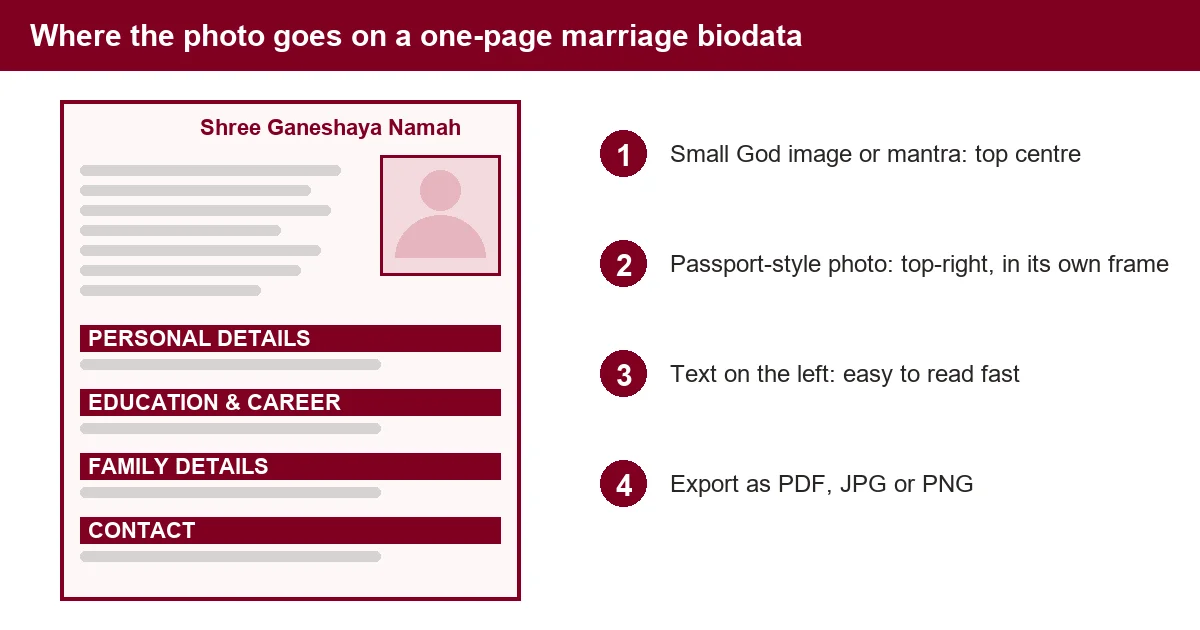
- Keep the main photo passport-style and place it in a small box at the top-right of the biodata.
- Skip filters, sunglasses, group photos and heavy edits. An honest photo builds trust.
- A text-only biodata is fine for a first message, but most families will ask for a photo before going ahead.
- Export the finished biodata as PDF, JPG or PNG so the photo stays in place. Biodata99's biodata maker lets you upload and crop the photo before downloading.
What is the best photo for a marriage biodata?
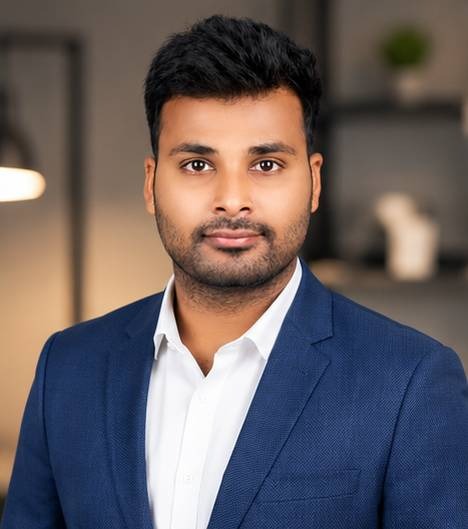
A marriage biodata (also written "bio data") is a one-page personal profile that families exchange to start a matrimonial match (see the Wikipedia entry on biodata for the term's background). The photo for a marriage biodata is the passport-style portrait placed on that page so the other family can recognise you at a glance. The best one is recent, sharp, front-facing and plainly lit: clean clothes, a natural half-smile and a simple background. It should look like you on a normal good day, not like an edited or filtered picture.
Families usually look at the photo first and read the details second, so a blurry or crowded picture can cost you attention before they reach your education, family and profession. If you are still deciding what else to write, the guide to writing a marriage biodata covers the text, and this page covers only the picture.
What people search for about biodata photos
Methodology: on 7 Nov 2026 we analyzed three data sets. The first was 102 related keywords from Keyword Tool (India, English). The second was its Questions tab for "biodata photo", with about 60 real question searches such as "is photo mandatory in biodata". The third was the top 100 "biodata photo" rows in Semrush Keyword Magic (India). Together, the photo searches add up to about 3,600 a month, and Keyword Tool shows them growing 165% over the last 48 months (source: Keyword Tool, India, Nov 2026). The figures below are estimates, so treat them as direction, not exact counts.
Unique insight: the demand is not one question but five. People ask which photo to use, how to take it, how to pose, whether to skip it, and where a God image goes. Most pages answer only the first, which is why this guide covers all five.
| Search | Monthly searches (estimate) | What people want |
|---|---|---|
| photo for marriage biodata | 720 to 880 | Which photo to use |
| biodata image / biodata photo | 880 to 1,300 | Photo or background image for the biodata |
| how to add photo in biodata | 110 (plus 30 for MS Word) | Adding the picture in Word or a maker |
| is photo mandatory / necessary in biodata | listed, volume too small to measure | Whether a photo is required |
| photo poses for marriage biodata | 50 | How to stand and pose |
| how to click photo for marriage biodata | 40 | Taking it at home |
| biodata for marriage without photo | 90 | Whether a photo is required |
| ganesh / ganpati photo for marriage biodata | 10 to 30 | Auspicious image at the top |
In short, the sections below answer each of those questions in turn. Moreover, the numbers change over time and differ by tool, so we will refresh this page when the data moves.
Which marriage biodata photos should you use?
| Photo type | Use it for | Tip |
|---|---|---|
| Headshot (passport-style) | Main photo on the biodata page | Face and shoulders, eyes at the camera, plain background |
| Mid-length (waist up) | Optional second photo shared separately | Shows clothing and posture; stand straight |
| Full-length | Shared later on request | Full body, simple setting, no group |
| Candid or casual | Not on the biodata | Keep for conversation after the families connect |
Keep one main photo on the page and send the extras by message. This also keeps your biodata at a single readable page, in line with the layout shown in our biodata guide.
Biodata photo size and file quality
A passport-style portrait is a front-facing head-and-shoulders photo on a plain background, commonly printed at about 3.5 x 4.5 cm. For a printed or shared biodata, that is the size to aim for. However, there is no single official size for a marriage biodata (the government's Passport Seva portal sets its own strict photo rules for passports, which do not apply to biodata), so judge by clarity: the face should stay sharp when the page is zoomed on a phone.
- Start big, crop later. Upload the original photo from your phone, not a screenshot or a forwarded WhatsApp copy, which is already compressed.
- Crop to face and shoulders. Leave a little space above the head so the forehead is not cut.
- Keep the shape consistent. A portrait (vertical) frame fits most templates better than a wide one.
- Export as PDF, JPG or PNG. This stops the photo from shifting when the receiver opens it on a different phone or computer.
In the Biodata99 builder, you upload the photo, crop it to the face and adjust its size and corner style inside the template's photo frame. Browse layouts on the biodata templates page; the samples are free to preview.
Photo poses for marriage biodata: boys and girls
Poses for boys
- Straight shoulders, face the camera, chin level and a relaxed smile.
- For a mid-length photo, stand upright with arms relaxed or one hand lightly in a pocket.
- Wear a plain shirt, kurta or formal jacket. Our boy marriage biodata format shows how the photo sits with career and family details.
- Avoid sunglasses, bike or car poses, gym selfies and cropped group photos.
Poses for girls
- A calm, front-facing portrait with a soft smile and the face evenly lit.
- Shoulders slightly angled looks natural; a very tilted head can look staged.
- A traditional or smart outfit with simple jewellery works well. The girl's marriage biodata format shows the full layout.
- Avoid heavy filters and side-angle selfies; they make the photo look different from real life.
Therefore, the practical rule for both is simple. For example, if a relative would not instantly recognise you in the photo, it is not right for a biodata. Similarly, a photo you would be embarrassed to see printed is better left out.
How to click a photo for a marriage biodata at home
You do not need a studio to get a good biodata photo. A phone and a bright window are enough.
- Find soft daylight. Face a large window in the morning or late afternoon. Avoid harsh midday sun and avoid having the window behind you.
- Pick a plain wall. A white, cream or light-coloured wall works. Move posters and clutter out of the frame.
- Set the phone at eye level. Use the rear camera, not the front one, and ask someone to shoot from 1.5 to 2 metres away so your face is not distorted.
- Switch off filters and beauty mode. Keep the picture natural.
- Take many shots and choose one. Check that eyes are open, the face is sharp and the shoulders are straight.
If you prefer a studio shot, any local photo studio can do a passport-style portrait. Ask for the original digital file, not only the print.
Background, attire and editing
- Background: plain white, cream or light grey. Busy scenes, tourist spots and party photos pull attention away from your face.
- Clothes: neat, comfortable and in solid colours. Traditional wear is common; smart casual also works. Avoid loud prints and logos.
- Colour photo: use colour rather than black and white, so skin tone and clothing look accurate on screens.
- Editing: crop and light brightness correction are fine. Skip beauty filters, heavy retouching and AI-generated or AI-enhanced faces. The photo should match how you look in person.
Biodata image and background: what to use
Many people who search for a "biodata image" want one of two things. Some want the photo itself. Others want a background for the page. The photo is covered above. For the background, a few simple rules keep the biodata easy to read.
- Keep it light and plain. A white, cream or very soft pastel background makes dark text easy to read on a phone screen.
- Use a subtle border or corner design only. Heavy patterns, bright gradients and large flowers compete with your face and your details.
- Check contrast. If the text is hard to read when the page is zoomed out, the background is too busy.
- Do not put your photo on a patterned area. Keep the photo frame on a plain part of the page.
- Use your own or a licensed image. Avoid copying a background from a random website, because it may be low quality or not free to reuse.
The Biodata99 builder includes background and sticker options, and you can choose ready-made designs on the biodata templates page. Samples are free to preview.
Biodata with photo or without photo?
Both are used in practice. Here is when each makes sense.
| Option | Good when | Watch out for |
|---|---|---|
| With photo | Sending the biodata to relatives, matchmakers or a family directly | Photo may be forwarded; share only with people you trust |
| Without photo | First message to an unknown contact, or when privacy matters, especially for girls | Many families will ask for a photo before taking the matter forward |
Also, if you leave the photo out, write a line such as "Photograph available on request" in the biodata so it does not look like something is missing. Our guide on why marriage biodatas fail to get responses lists other format mistakes to avoid. Also keep contact details limited: never include your full home address or ID numbers on a biodata you send widely.
How to add a photo to a marriage biodata
In a biodata maker (fastest)
- Open the Biodata99 biodata maker and fill in your details.
- Upload your photo and crop it to face and shoulders.
- Choose a template with a photo frame and adjust the photo size and corners.
- Preview, then download as PDF, JPG or PNG.
In Word or Google Docs
- Make a small table or text box at the top-right for the photo.
- Insert the picture, and set its text wrapping so it does not push the text around.
- Resize inside the box and keep the proportions locked.
- Save or export as PDF before sharing: Microsoft explains how to save a Word file as PDF, and Google explains how to download a Google Doc in other formats. A PDF also stops edits and layout changes; see marriage biodata format PDF for samples.
Ganesh ji or Ganpati photo on a marriage biodata
Many Hindu families put a small Ganesh ji picture or the words "Shree Ganeshaya Namah" at the very top of the biodata as an auspicious start. This is a tradition, not a rule. Keep the symbol small and centred at the top, and keep your own photo in a separate frame at the top-right. Do not replace your photo with a God image, because the other family still expects to see you. The marriage purpose biodata format page shows a layout with a top heading.
Common photo mistakes to avoid
- Old photo. Use one from the last 6 to 12 months.
- Group or cropped photo. It is confusing to find which person is you.
- Sunglasses, caps or heavy shadows. They hide your face.
- Filters and heavy editing. They create a gap between the photo and the real person.
- Low-quality screenshot. It looks blurred once resized into the biodata.
- Large, crowded photo. It leaves little room for the details that families actually read.
Photo for marriage biodata: frequently asked questions
Short answers to the questions people search for most.
What is the best photo for a marriage biodata?
Is a photo mandatory in a biodata? Can I make a marriage biodata without a photo?
What size is a passport biodata photo?
How to take photos for a biodata at home?
How many photos should be on a marriage biodata?
What poses work best for a boy’s marriage biodata photo?
What poses work best for a girl’s marriage biodata photo?
How to add a photo in a biodata, including in MS Word?
How to change or edit the photo in a biodata?
Can I use a filtered or edited photo, or edit it on Canva?
What is a biodata image, and can I use one from the internet?
Can I put a Ganesh ji or Ganpati photo on a marriage biodata?
Should I put a photo on a job resume or CV too?
Conclusion
A good photo for a marriage biodata is simple: recent, sharp, front-facing, plainly lit and natural. Take it in daylight against a plain wall, keep one passport-style portrait on the page, and share extra photos separately. Once your photo is ready, create your biodata with Biodata99, upload and crop the photo, and download it as PDF, JPG or PNG.