
Marriage Biodata Background: HD Designs, Colours & How to Add One
A thin border, readable colours and a faint watermark are all a marriage biodata needs.
By Baliram Giri, Founder, Biodata99

In this guide
Key Takeaways
- The best marriage biodata background is light and simple: a cream or white page with a thin border or a faint motif.
- Keep any background illustration at about 20 to 40 per cent opacity so the text stays easy to read.
- Match the colours to your family’s taste, but always keep the text dark and the photo frame on a plain area.
- Avoid dark or heavily patterned pages. They print poorly and are hard to read on a phone.
- In the Biodata99 biodata maker, the Theme and Graphics panels let you change the background without retyping your details. You can preview free sample designs first.
What is a marriage biodata background?
A marriage biodata (also written “bio data”) is a one-page personal profile that families exchange to start a match. A marriage biodata background is the design behind the text of that page. It covers the page colour and the border or frame. It also covers any faint image, such as a floral pattern, a mandala or a God image used as a watermark. It sets the tone of the page, but the details still do the real work. Therefore, a good background frames the information, while a poor one competes with it.
One clarification first. In searches, “biodata background” is also used for the written background in a biodata: family background and educational background. Those are the details you type into the form, and they are explained in our guide to writing a marriage biodata. This page is only about the design. If you are choosing the picture of yourself instead, read the guide to the photo for a marriage biodata.
What do people search for about biodata backgrounds?
Methodology: on 13 Nov 2026 we analyzed search data for India from three tools. Semrush gave keyword volumes (Keyword Magic and bulk overview). Keyword Tool gave 251 suggestions plus its Questions tab for “biodata background”. WriterZen gave 76 related topics. We also read the live Google results for “marriage biodata background hd” and checked competitor traffic in Similarweb. Volumes are tool estimates, so read them as direction, not exact counts.
Unique insight: the demand has two shapes. Most of the volume is for a ready, good-looking design (“marriage biodata background hd”, “background for marriage biodata”). A smaller group asks how to write the family background. We found that most plain “background image” searches have fallen over the last 48 months (source: Keyword Tool, India, Nov 2026). People seem to be moving from hunting for loose images to using a biodata maker that already applies the design. That is why this guide teaches how to choose and apply a background, not just show pictures.
| Search | Monthly searches (India, estimate) | What people want |
|---|---|---|
| biodata background | 2,400 | Mixed: the design, or the family background to write |
| marriage biodata background hd | 1,300 | A sharp, good-looking page design |
| marriage biodata background / background for marriage biodata | 720 each | Design ideas for a marriage biodata |
| biodata background images | 720 | Pictures to look at or reuse |
| background image for biodata / bio data background | 590 each | An image behind the text |
| biodata frame | 390 | A border or frame design |
| biodata background design | 210 to 260 | Design styles |
| how to write family background in marriage biodata | 40 | The written section, not the design |
Sources: Semrush and Keyword Tool, India, 13 Nov 2026. Figures are estimates and vary by tool.
In our check of the live Google results, the top positions were mostly image galleries, Pinterest boards and template pages with little explanation of how to choose or apply a design. Competitor traffic is modest. The one biodata maker with a dedicated background page showed about 19,000 visits a month (source: Similarweb, snapshot of 1 Oct 2026). Its top ranked keywords were format and template searches, not background searches. In short, that leaves room for a clear, practical guide.
Which type of biodata background should you use?
| Type | Best for | Watch out for |
|---|---|---|
| Plain white or cream | Printing, long biodatas, quick sharing | Can look bare; add a thin border if you want more warmth |
| Border or frame only | The classic, safe choice for most families | Keep text well inside the border so nothing touches the edge |
| Soft floral or leaf pattern | A warm, wedding-style page | Keep it faint and away from the photo frame |
| Cultural or religious motif (Ganesh outline, mandala, crescent) | Families who want an auspicious or traditional touch | Use it small or as a faint watermark; keep it respectful |
| Dark or full-colour page | Rarely a good idea | Weak contrast, heavy ink on print and tiring to read on a phone |
The Biodata99 builder includes BG Images such as a Ganesha outline, a Krishna illustration, a Shiva mantra mandala and a Ram mandala, which sit behind the content as a faint watermark. It also has religious stickers and a set of ready template frames; browse them on our biodata templates page.
What do good marriage biodata background designs look like?
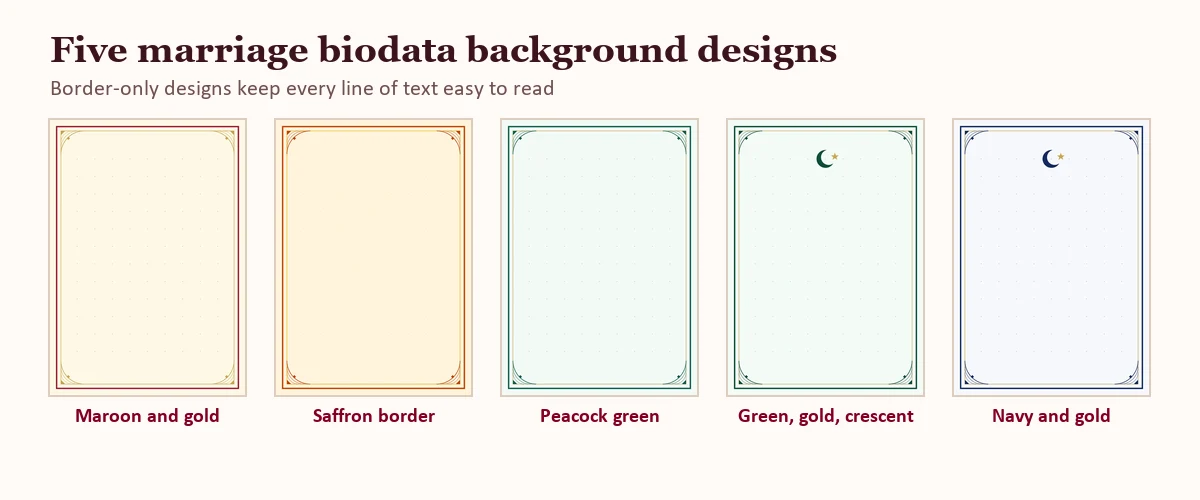
These are five of our own border-only designs. Each uses a light page and a thin, symmetrical frame, so every line of text stays easy to read. Preview more on our Marathi biodata maker and Muslim biodata format pages.
How do you choose the colours for a biodata background?
Start from the page, not the border. A light page (white, cream, ivory or a very pale tint) gives the text maximum contrast. Then choose one border colour and one accent colour. The table shows pairings that work well; they are suggestions, not rules.
| Pairing | Feel | Suits |
|---|---|---|
| Cream page, maroon and gold border | Traditional, formal | Hindu and Marathi biodatas |
| Cream page, saffron and orange border | Warm, festive | Traditional families |
| Pale mint page, deep green and gold border | Calm, graceful | Muslim biodatas, general use |
| White or pale blue page, navy and gold border | Clean, professional | Working professionals, NRI profiles |
| Ivory page, rose gold or blush accent | Soft, modern | A gentler, contemporary look |
For readability, dark text on a light background is the rule. Accessibility guidance suggests a contrast ratio of at least 4.5 to 1 for normal text (see the W3C contrast explainer), India’s government web guidelines use the same 4.5 to 1 ratio for text (GIGW, section 5.2.14). A cream page with near-black text clears that comfortably. In the Biodata99 builder, the Theme panel offers ready Background Themes. Examples are Royal Maroon, Golden Elegance, Emerald Luxury, Peacock Majesty, Saffron Blessings, Rose Gold and Classic Charcoal.
What opacity should a biodata background have?
If you add a background illustration, its opacity decides whether the biodata stays readable. Opacity is how solid or see-through an image is, from 0 to 100 per cent. A watermark is a faint image placed behind the text. A good working range for a biodata watermark is 20 to 40 per cent. The image then looks like a soft watermark. At 100 per cent it runs straight through the words. We made the comparison below with the same pattern at both strengths.
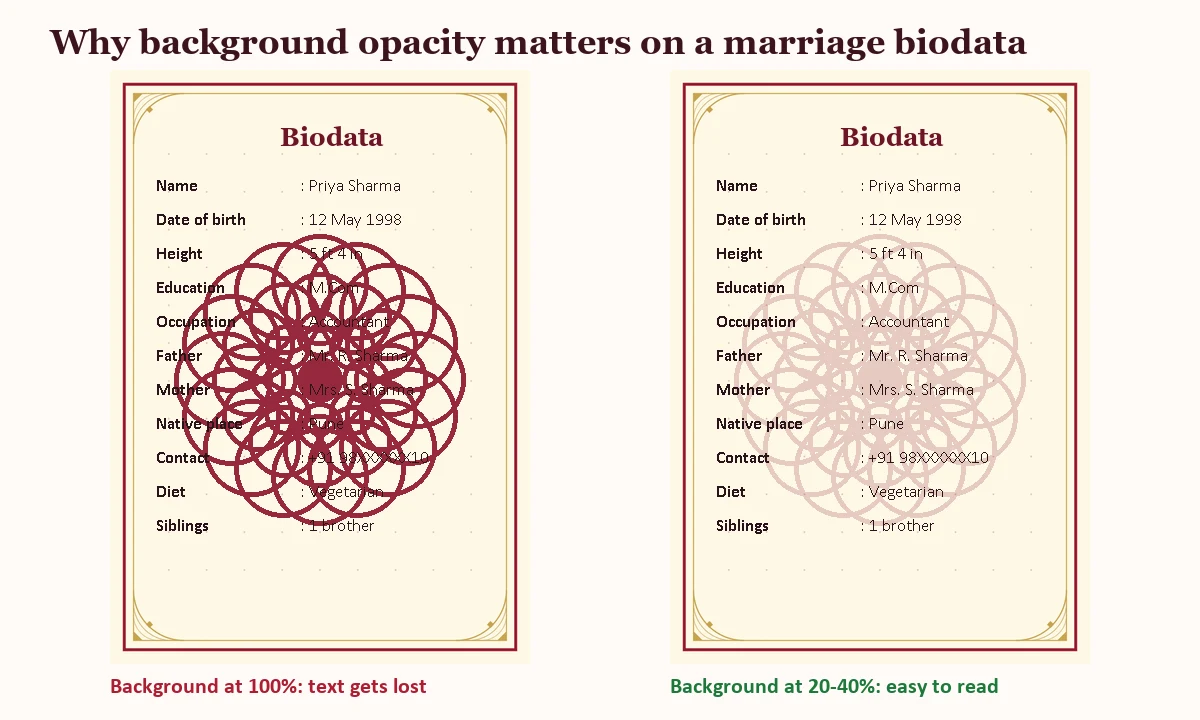
Two quick checks help. First, zoom the page out until you can only just read it; if the text disappears into the pattern, the background is too strong. Second, keep the pattern away from the photo frame and from the lines that families read first: name, date of birth, education and occupation.
How do you add a background in the Biodata99 biodata maker?
- Choose a template. Open the biodata maker and pick a template. Templates come with their own frame, and you can filter them.
- Fill in your details. Use the Fields panel to type your information first. Design comes after content.
- Pick a background theme. Open Theme, then Background Themes, and choose a preset.
- Add a background image if you want one. BG Images is the tab inside Graphics that holds the background illustrations. Open Graphics, then BG Images, and select one. A watermark panel lets you change its opacity, scale, and horizontal and vertical position.
- Set the opacity low. Aim for about 20 to 40 per cent so the design supports the text.
- Check spacing, then download. Use Spacing to tidy the layout, then download as PDF, JPG or PNG.
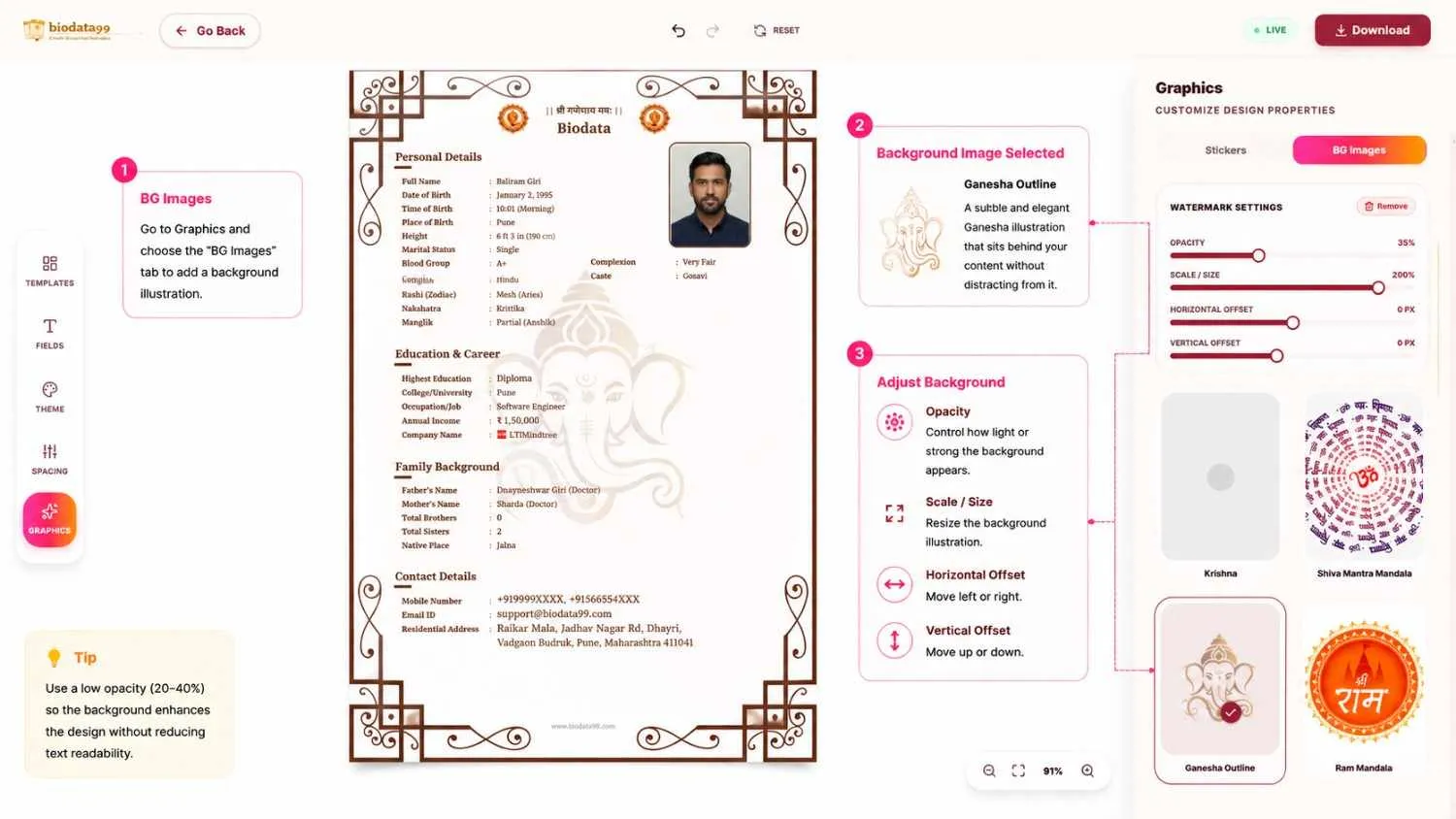
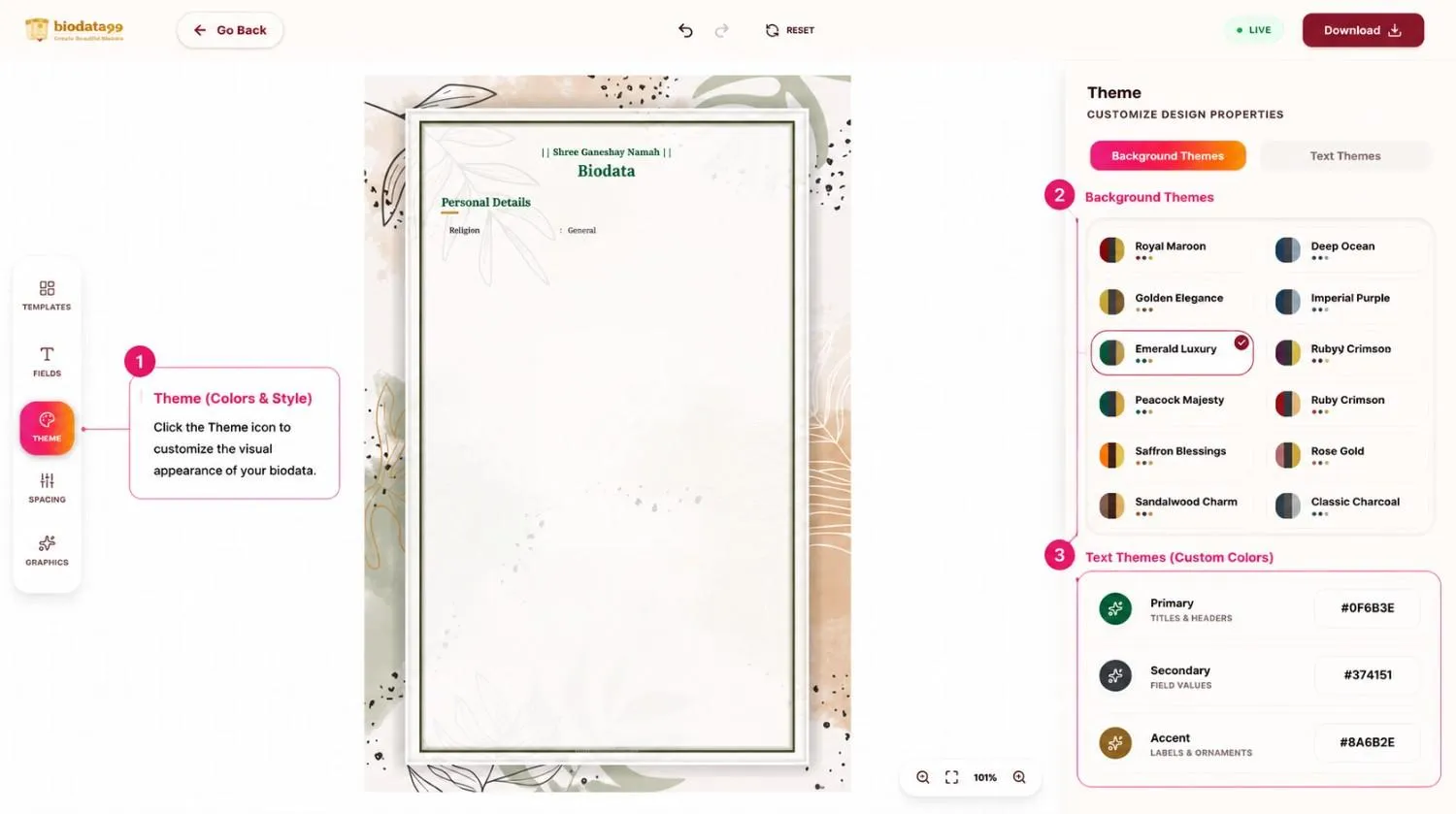
Because the Theme and Graphics panels sit apart from the Fields panel, you can try several looks and keep the same details. Our complete guide to making a biodata covers structure, and the biodata templates page lets you preview free samples before you start.
How do you add a background to a biodata in Word?
If you prefer Word, you can get a similar result in a few steps.
- Open the Design tab and choose Page Borders to add a frame, or Page Color for a light tint.
- For a faint illustration, use Insert, then Pictures. Right-click the picture, choose Wrap Text, then Behind Text.
- Select the picture and raise its transparency in Picture Format (older versions have a Washout option) until the text is easy to read.
- Keep the photo frame on a plain area, then save the file as PDF. Microsoft explains how to save a Word file as PDF, and our marriage biodata format PDF page shows PDF samples.
However, the main risk in Word is layout shift: a picture set “behind text” can move when the file opens on another device. Exporting to PDF locks it in place.
Which format and background suit print or WhatsApp?
| Use | Best format | Background advice |
|---|---|---|
| Printing for a meeting | PDF on A4 | Light page, thin border; avoid dark fills that use heavy ink |
| WhatsApp or social media | JPG or PNG image | Keep it simple; text must stay readable when the image is zoomed on a phone |
| Email to a family or matchmaker | A simple design keeps the file small |
For example, if you may print it, keep a margin so the border does not get trimmed by the printer, and test one page on your own printer first. Also share the same finished file everywhere, so every family sees one consistent design.
What biodata background mistakes should you avoid?
- Full-strength patterns. A mandala or floral at 100 per cent opacity hides the details.
- Dark pages. They print poorly and strain the eyes on a phone.
- Background behind the photo. Keep the photo frame on a plain area.
- Too many motifs. One border and one faint watermark are enough.
- Copying images from random sites. They may be low quality or not free to reuse; use the built-in designs of a biodata maker.
- Choosing design before content. Finish the details first, then style the page.
Marriage biodata background: frequently asked questions
Short answers to the questions people search for most.
What is the best background for a marriage biodata?
What does “biodata background” mean?
Can I use a plain white background for a marriage biodata?
Which colour is best for a marriage biodata background?
What is a good opacity for a background image or watermark on a biodata?
How do I add a background to my marriage biodata?
Can I change the background without retyping my details?
Can I download an HD biodata background image?
Which background should I use for Muslim, Marathi or other community biodatas?
Is a dark background fine if I only share the biodata on WhatsApp?
Should the background go behind my photo?
Will a background make my biodata PDF very large?
Conclusion
The right marriage biodata background is quiet: a light page, a thin border, perhaps a faint motif at 20 to 40 per cent opacity, and dark, readable text. Choose colours your family likes, keep the photo frame clear, and use PDF for print and JPG or PNG for sharing. When you are ready, create your biodata with Biodata99, try a few background themes and download the one that reads best. If you have a question about your biodata design, you can contact us.
Editorial note: the sample details in our illustrations are fictional, and the search figures are tool estimates collected on 13 Nov 2026. We will refresh this guide when the data changes.